

Table of Contents
Why are PDF Fonts Not Displaying Correctly?
Using the perfect font can make or break the impact a document has. Fonts are also complicated. If you have a PDF file that is not displaying well, it’s likely that PDF font mapping is the culprit.
A PDF document expects to have its fonts installed wherever it’s viewed. When it’s opened, the PDF matches its referenced fonts to the local system’s fonts. If all the fonts are available, the document looks great. Success relies on the set of fonts available on the viewing PC. Using standard system fonts as much as possible will help prevent font mismatches. An exception is branding, where the font used is a valuable, recognizable asset. It should never become compromised and its font text should be converted to vector paths to protect it.
Listing of standard fonts by system
- The 14 standard PDF fonts are Courier (Regular, Oblique, Bold, Bold Oblique), Helvetica (Regular, Oblique, Bold, Bold Oblique), Times (Roman, Italic, Bold, Bold Italic), Symbol, and ITC Zapf Dingbats.
- Fonts available on all Windows 10 systems
- Fonts included with macOS
- Fonts included with Adobe Cloud subscriptions.
Useful Font Resources


Top 5 Reasons Fonts Look Wrong
1. Font Substitution
When the PDF file can’t find the same font on the reader’s PC, it will choose the closest substitute. This may be almost impossible to see or very obvious. It all depends on the font chosen as a substitute. There are three basic options when dealing with font substitution:
- Accept the substitution if it’s a minor difference
- Buy the missing font and install it on your system
- Define a font mapping (see below) if possible
Example of a font substitution with a minor difference. Adobe does a very good job when substituting fonts. They get close in most cases. Close enough that there’s no need to purchase fonts or spend a lot of time troubleshooting. In the example below, substituted text (yellow) is placed over the original embedded font text (red). The visible red marks show where the substitution deviates from the original font.

Yellow substituted font text is placed over original red embedded font text.
2. Embedding Fonts to Avoid Font Substitution not Possible
Several PDF creation tools allow you to embed fonts or font subsets. Embedded fonts travel with the PDF file and ensure accurate display on any system. Be careful because they will increase file size, usually at least doubling it. Due to license restrictions, embed fonts at your own risk. You can only embed fonts with permission. Even free, open-source fonts can have restrictions. Example of Adobe’s Font Embedding Policy
A note about Visual integrity Software and Embedded Fonts. In compliance with font rules, our programs do not embed fonts by default. We reference the fonts by their names. If fonts, with the same names, are on the target PC, the file will open and display as intended. If the same fonts are not on the PC, which is much more likely, the text includes the closest allowable font. If you need fonts embedded for a project, we can do that for you as a custom service, with proof of license.
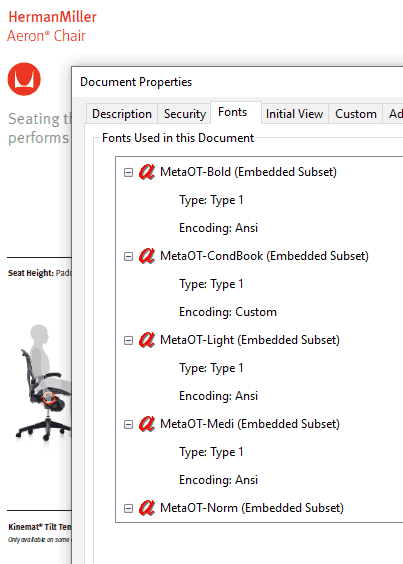
How to see what embedded fonts your document contains.
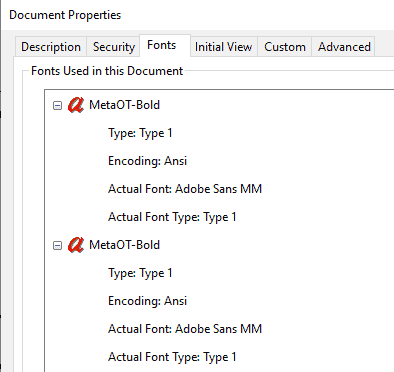
Open the PDF in either Reader or Acrobat. Bring up the document properties (Ctrl-D or Cmd-D), then go to the Fonts tab. Here, you can see the state of each font. The two examples below show the same font when it’s embedded and when it has been substituted.
3. When PDF Document Font Names Don’t Match PC Font Names, Use Font Mapping
For fonts to display as intended in a PDF file, the same font with the same name must be on both systems. Unfortunately, the exact same font may go by several different names. Arial Bold on your system, for example, may be “EHJPKB+Arial-Bold” in the original file. Even though these are identical fonts, the PDF does not know it because they have different names. You have to tell it with a PDF font mapping. In this example, map “EHJPKB_Arial-Bold” as “Arial” with font style “Bold”.
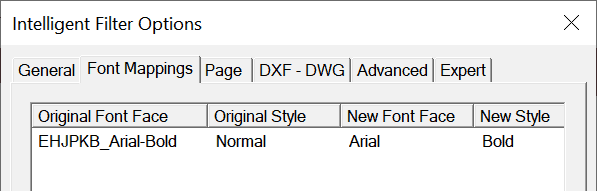
Mismatches are common. Resolve them whenever possible through font mapping. If mapping the font is not possible, it’s substituted as described above.
4. Unknown Font in the PDF Document
Ensure an exact match by converting formatted text to bezier curves. When you need a precise match, but the source font is unknown or not available, it’s best to convert the text to a graphic. This is an excellent approach for logos and other brand assets. It’s also recommended for technical text like equations and formulas. Once converted to graphics, they are no longer editable and there’s no possibility to introduce error during font substitution.
A note about Visual integrity Software and Text as Curves. Our programs offer a “Characters to Curves” option. Using it, each character renders as a bezier curve object. This graphical representation of the character uses font information stored in the PDF. If the font was not embedded in the PDF, we refer to the /fonts/ directory in the installation folder. Add Type 1 or TrueType fonts to this folder as needed to ensure a perfect match. To outline specific fonts during conversion, contact us.
5. It’s a Kerning Issue, Not a Font Issue
When PDF is converted into vector formats such as SVG or EMF, kerning may be the culprit if the text doesn’t look right. Kerning is the process of adjusting space between characters to make the text more visually appealing. This feature is only available for use with proportions fonts; not fixed-width fonts. Please contact us if you need more information on how to configure this. Turning this option on could improve the WYSIWYG matching of the text strings.
In Summary…
Look for Font Warnings. Many programs that output PDF produce errors and warning logs. Check these if you create or receive a PDF file that doesn’t look right.
Contact Us. We have 25+ years of expertise built up around PDF, file formats, and fonts. We may be able to help you make sense of your font issues.